

How to Make a Hologram Out of an AI
Avatar
Introduction
My nephew asked me if I could make a hologram of him. I didn\’t
know the answer, so I started testing.
The first attempt failed badly. Blurry edges, wrong export
settings, and a lot of laughter from an 8-year-old. The problem was simple: low
bitrate made the video look pixelated on the pyramid display.
Once I fixed the settings, everything changed. What I thought
would take days actually took about an hour.
Here\’s what you\’ll need:
|
Item |
Why |
|
Phone |
The |
|
AI |
Makes |
|
Plastic |
Makes |
|
Dark |
Makes |
According to a 2024 report by Grand View Research, the global
hologram market is growing 28% annually. You don\’t need to wait for that
future. Here are five steps that work.
Step 1: Pick Your Tool
Three options. One clear winner for beginners.
HeyGen – Upload a 2-minute video of yourself. The AI
creates a digital twin. Lip sync is surprisingly good. Free plan has a
watermark. Paid plans exist. Best for: people who want results in 10 minutes.
D-ID – Works from a single photo. Any photo. Upload a
picture, add a script, and the avatar talks back with expressions. There\’s a
tiny audio delay but most won\’t notice. Pay as you go.
NVIDIA Omniverse – Full 3D control. Your avatar can
walk, wave, dance. Free for personal use. But you need a powerful graphics
card. Skip this unless you\’re a 3D artist.
Start with HeyGen. You can explore the others later.
Step 2: Create Your Avatar Video
Two paths here.
Record yourself – Film 2-5 minutes talking to the
camera. Look at the lens, not your face on the screen. Use your hands
naturally. Speak normal speed. Upload to HeyGen or Synthesia. The AI processes
everything in about 15 minutes.
Build a character – Use Ready Player Me. Pick hair,
eyes, clothes. Export to D-ID or Omniverse. Type your script. AI handles the
lip movement.
Tips to avoid early mistakes:
•
Patterned backgrounds confuse the AI badly. Use a plain
wall or green screen.
•
Don\’t rush your words. Aim for 130-150 words per minute
(regular news anchor speed). Too fast and your avatar looks nervous.
Step 3: Export Settings
This is where most beginners get stuck.
|
Setting |
Value |
|
Resolution |
1080p |
|
Background |
Green |
|
Format |
MP4 |
|
Frame |
30 fps |
|
Bitrate |
10 |
Low resolution = blurry hologram. No transparent background =
no floating effect. Low bitrate = pixelated edges.
My first export failed because I tried to save file space with
a low bitrate. The edges looked jagged and blocky. My nephew laughed again.
Pro Tip: Black
background works better than green screen for pyramid displays. Black blends in
naturally. Green sometimes leaves a visible outline that ruins the magic. Test
both on your screen.
Step 4: Convert to 4-Sided Format
A normal video won\’t work on a pyramid. You need four sides.
Free online converter – HoloPyramid or HoloDisplays.
Upload, click \”4-sided effect,\” download. About 2 minutes.
CapCut – Import video. Make three copies. Rotate each
90, 180, and 270 degrees. Arrange in a 2×2 grid. Export. Free.
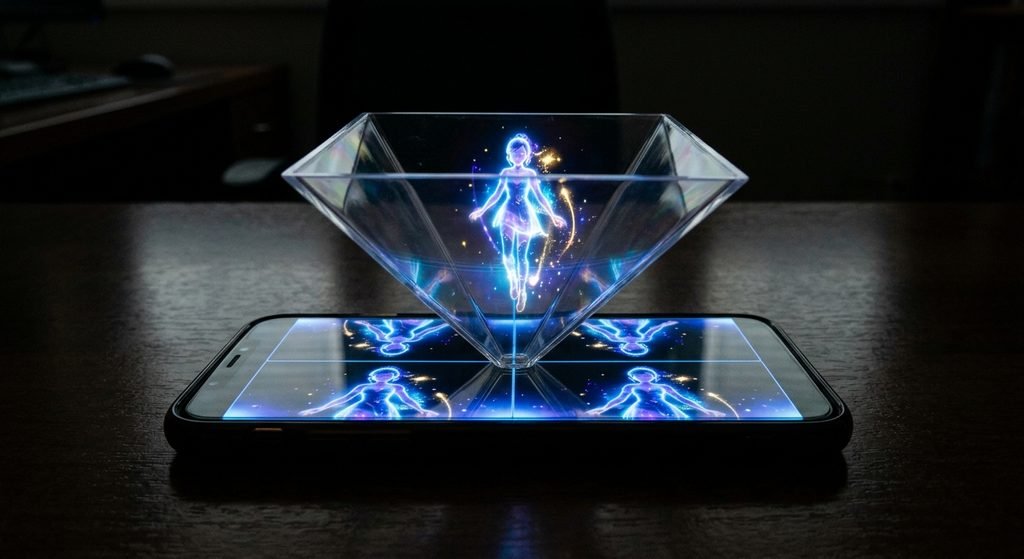
Skip it – Play normal video on phone. Put pyramid on
screen. The reflection creates a floating image. Only faces one direction but
great for testing.
For videos under 1 minute, use the online converter. For
longer stuff, CapCut gives you more control.
Step 5: Display Your Hologram
Three price points.
|
Budget |
Setup |
|
Under |
Phone |
|
$50-100 |
Hologram |
|
$500+ |
Pepper\’s |
The cheap pyramid method is surprisingly impressive. Keep the
room dark, phone on black surface, brightness max. Looks way more expensive
than it is. The fan works but makes a humming noise.
Tips That Actually Help
•
Resolution is not optional. 1080p minimum. For custom
3D models, use 52+ facial blendshapes for smooth lip movement.
•
Lighting matters more than you think. Turn your screen
brightness down for dark rooms, up for bright rooms.
•
Audio timing: the sound should lead the picture by a
tiny bit. When the picture leads, people feel like something is wrong — they
can\’t explain why.
•
Micro-movements keep it real. A completely still avatar
looks like a robot. Most AI tools add head nods and eyebrow raises
automatically.
•
Always test on the actual display you\’ll use. What
looks perfect on your computer might look terrible on your phone.
Common Problems
|
Mistake |
What Happens |
|
Low |
Looks |
|
Wrong |
Pixelated |
|
Bad |
Illusion |
|
No |
Creepy |
|
Rushed |
Avatar |
Where People Use This
Business
At a local tech event last month, one company used a
holographic presenter instead of slides. People crowded their booth all
afternoon. It was the most memorable display there.
Education
Medical students learn from floating instructors. One history
teacher uses a hologram of a historical figure — her students remember those
lessons way better than regular ones.
Customer Support
Research suggests people trust visual avatars more than
text-only chatbots.
Social Media
Virtual influencers have millions of followers. Holographic
concerts happen worldwide. This space is moving fast.
What\’s Next
Real-time interactive holograms are coming. Some companies are
building systems where you can have actual conversations with a floatingavatar.
The holy grail? A hologram that remembers you. Recognizes your
face. Remembers what you talked about last time. Several products have been
announced — we\’ll see which ones actually work.
Early adopters have a real advantage right now. Holographic
sales assistants. AI brand ambassadors. Virtual presenters. The businesses
testing this stuff today will define the category tomorrow.
Conclusion
Five steps. About an hour of your time.
|
Step |
Action |
|
1 |
Choose |
|
2 |
Make |
|
3 |
Export |
|
4 |
Convert |
|
5 |
Display |
That $15 plastic pyramid? It actually works. Keep the room
dark, put your phone on a black surface, crank the brightness. The effect is
real.
You don\’t need expensive gear or a technical background. You just need to start.
Open HeyGen or HoloPyramid right now. Make your first
hologram. Then show it to someone. Watch their face when it floats.
That feeling? Worth the hour. Now go
make something.
Frequently Asked Questions
1. How to turn a picture into a hologram?
Upload your photo to D-ID. Add a script or voice recording. The AI animates the face. Download the video. Then follow steps 3-5 above. Takes about 10 minutes total. Best results come from photos where the person is looking straight at the camera.
2. How to create an AI avatar model?
Two paths. Beginners: Ready Player Me, Synthesia, or HeyGen. Five minutes, no skills needed. Advanced: Unity or Unreal Engine. You\’ll need 52+ facial blendshapes and a full skeleton rig. Plan for 20-40 hours of learning.
3. How to create a 3D hologram image online for free?
HoloPyramid or HoloDisplays. Upload your video. Select \”4-sided pyramid output.\” Download. Play on your phone under a plastic pyramid. Dark room + max brightness = best results.
4. How to create a human hologram?
You need three things: a 3D scan (use an iPhone with LiDAR 12 Pro or newer), animation software like D-ID or Omniverse, and a display like Pepper\’s Ghost or transparent OLED. For personal projects, AI-generated humans are much easier and give similar results.
5. How can I create an AI avatar of myself?
HeyGen Instant Avatar or Synthesia. Record 2-5 minutes of
yourself talking. Plain background. Look at the camera. Speak naturally.
Upload. The AI trains for about 15 minutes. After that, you can type anything
and your digital twin will say it. Then follow the steps above to make it
float.